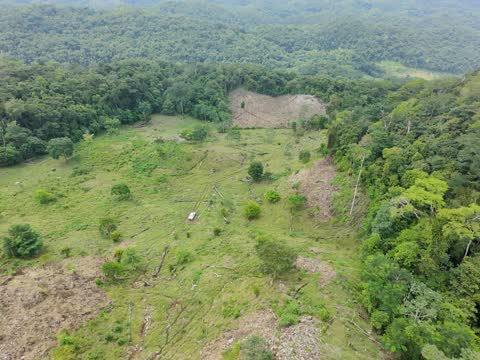
Photo of where I was earlier this month, taken with a drone
Mexico, 2026-10-31
I wanted to be online in more places, and somehow I considered cell networks to be the solution. If you can find a cheap plan, cellular data is the cheapest way to be online when out and about. Finding cheap plans is the hard part though. Also, I found out about global SIM cards that work on more than one cell network. Those would be great since there's some places here where one network has coverage but the others don't.
Photo of where I was earlier this month, taken with a drone
But here's the problem, most of those are intended for Internet of Things, so they have a fundamentally different pricing scheme. The one I have, and most I could find, charge a base rent that's very cheap, like one or two dollars a month. This is because whoever buys these tends to deploy hundreds or thousands of these at once so the price has to look reasonable at that scale. Then, mobile data itself is priced by the megabyte. Yes, like we were in 2008. You see, IoT devices don't watch TikTok. They usually send short data packets that only have concise information like text or numbers. Robotic messages, so to say.

Average IoT communication
That's not a problem for me, since I mostly use IRC, XMPP and WhatsApp, which are (usually) light enough. Each megabyte costs pennies, usually not more than 10 USD cents each. The chance of being online is itself of value for me, even if actually using the internet becomes expensive. But if you want to watch TikTok and YouTube for cheap, well, this ain't for you.
Using mobile data from my phone has several issues that quickly made it a rather poor option. First of all, it has Android, which can be tamed to use less mobile data to an extent, but it's very hard to control it tightly, it always wants to fetch notifications even for the apps you configured to restrict or avoid using mobile data. Regular Android devices don't give the user unrestricted (root) access to the underlying operating system to control the internal networking firewall directly, making it a very risky choice for a plan that costs $30 to $100 USD per gigabyte.
Secondly, the internal antenna on my phone sucks. It works for its intended purpose, but it's never going to work efficiently because otherwise it just wouldn't fit. Every phone is affected by this to an extent, though there's better phones than others. The device I need to actually take that mobile data must be able to use an external antenna, so it needs RF connectors, like SMA. There's no way around physics, a dedicated antenna you can locate wherever you want, even on the car's roof, will always outperform the integrated antenna on the device you need to hold (you can't put it outside) and is crammed along with the rest of the phone (it can suffer interference).
Thirdly, it has to work on a laptop, or be usable from one directly. Mobile data is usually associated with phones, but it doesn't have to be, you can use it from your laptop directly. I have way better control over the software in the laptop (say, I can install Linux) than over the phone's software. Also, I work mostly from my laptop, not the phone, so the phone is not even strictly necessary to begin with.
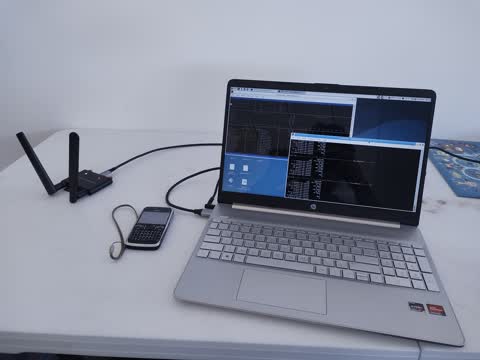
The ultimate 2010 workstation
Someone would say "just use satellite internet, it's not that expensive anymore, and it truly works everywhere". Makes sense, it does qualify, but it is simply too expensive for my usecases. They just don't sell per-MB plans without a very expensive base monthly fee tied to it. It would work for people who do want to use a lot of bandwidth for movies or videos, but not for me. Next.
A reasonable solution would be a MiFi router. Those are nifty, some even have a built-in battery, they have a built-in modem and a Wi-Fi radio, others look like USB sticks and you just plug them onto your laptop's USB port. It was almost a good idea, but I couldn't find one that has SMA ports, and I had two of these actually, of the USB stick kind. Their reception sucks, even more than a regular smartphone. The internal antenna is probably the same as that of a smartphone, but at least you can raise your phone and try to hunt more bars by holding it weird. You just can't do that with your laptop. Plus, the operating system in these usually sucks, either by looking for upgrades, pinging home, or simply not working correctly, same issues that plague consumer routers.
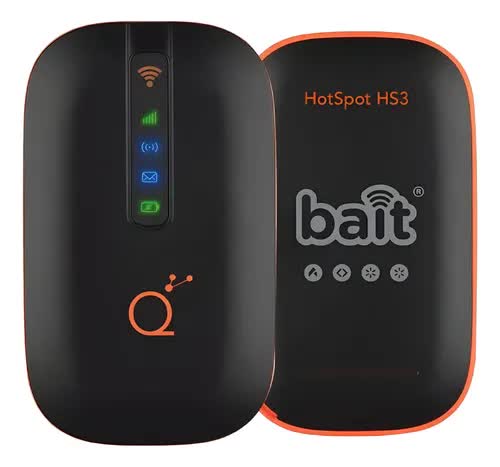
Carrier-provided MiFi modem, with battery
Maybe I could have simply hunted for free Wi-Fi or asked someone to share their mobile data using the hotspot function. But somehow this feels kind of unreliable. Free Wi-Fi can be made safe with a VPN, and there's some reputable free and paid VPN providers out there, so security alone is no longer a reason to discard free or public Wi-Fi. But it's free, meaning it will disappear for any reason. Also, asking someone to share their mobile data implies you have someone beside you with their own phone and that they're not themselves suffering the NO SERVICE samba.
Also, let's be real, I wanted to assemble something out of garbage I bought online or already had here. Some people will appreciate that, some will not, but I already did that and I'm here to explain what it is, what it's made of and how it works.

First of all, we have the lunch bag. It could have been anything, like a plastic box, but I already had this lunch bag and it's got the right size for this. A tupperware could have worked too, or a backpack, really, if it fits and can be readily opened and closed, it will work too.

What's up, doc
Then we have the actual electronics. We have three main components tucked in there: a USB powerbank, a small router and the 4G modem. The modem's case says 5G, but I put the modem inside, it's a 4G modem I already had. And there's an antenna as well.
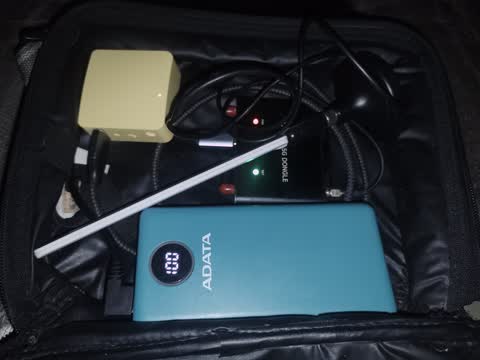
It's not a bomb, I promise
The USB power bank is an Adata 18W power bank, it promises a capacity of 20 Ah, which equals 74 Wh. The whole setup lasts 48 hours on a full charge from 100% to 0% if lightly used. Perhaps it will last less under heavy use, but no less than 36 hours. It doesn't need to be a fast-charge USB powerbank since the setup only needs 5V DC, but it needs to reliably provide at least 5W, which means a 10W-capable powerbank should do just fine.
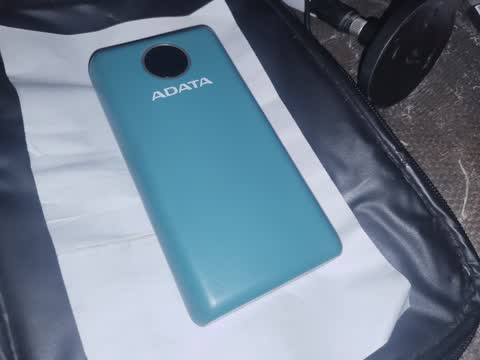
This brick has nearly twice as much stored energy as my laptop's battery
The yellow box is a GL.iNet GL-MT300N-V2 Mango. It runs on 5V DC, has a USB-A port for connecting modems, it has 2.4 GHz Wi-Fi, and critically, it is specifically designed to run OpenWRT. I removed the stock OpenWRT-based firmware and installed actual, official OpenWRT on it. Not all GL.iNet support official upstream OpenWRT even if the stock firmware itself is based on it, so if you need to do that, you absolutely need to do some research.
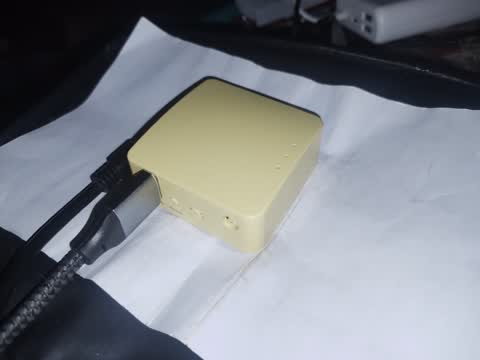
It's about the size of a matchbox, and yet it has 128 MB of RAM, 16 MB flash storage and a 580 MHz CPU
Finally, the black thing is the modem. It is actually an M.2 to USB breakout adapter, you put an M.2 form factor modem inside and the outside exposes the USB lines in a female USB-C port, as well as a SIM card slot on the case. Thus, it behaves like a USB version of the modem you just put inside. Most M.2 modems only use the USB lines on the M.2 slot, so it's very likely they'll work just fine on the adapter. The modem inside is a SIMCom SIM7600G-H, a 2G/3G/4G Cat.4 modem. In theory it can do up to 150 Mbps down and 50 Mbps up, but in real networks you're gonna reach far lower speeds such as 40 to 50 Mbps down and 30 Mbps up.
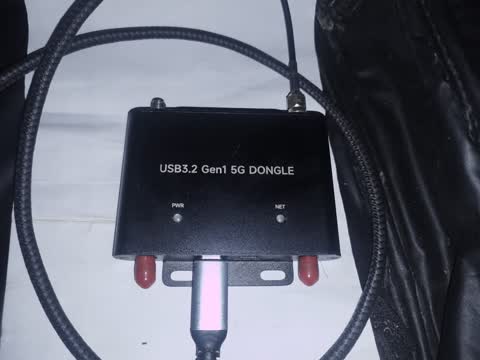
It's 2011 all over again, and honestly, it's better than 2026
There's an antenna, which is a generic no-name omnidirectional antenna with a length of 17 centimeters. Compensating for something? Anyway, the antenna is screwed onto a magnetic base adapter that can be put on a car's roof. No need to drill holes or anything. The base has a cable that is supposed to enter the car's open side window into your modem. The cable is a male SMA connector, the base has a female SMA the antenna screws onto. The cable has a length of about one meter. It fits in the lunch bag even when closed, so the modem can work even if the antenna is not deployed outside, but only if cellular signal is strong.
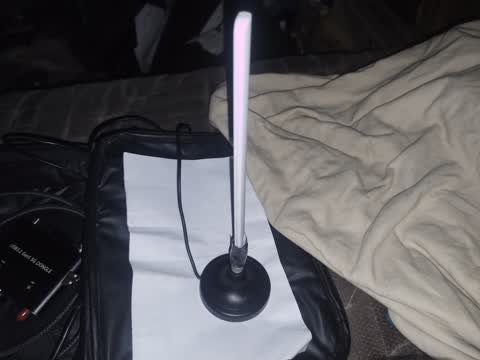
Bigger is better in RF
There's the cables too. The main power cable goes from the USB powerbank to the yellow router. It has 90-degree angles on the connectors so it fits in the lunch bag more easily and suffers less damage over time. The included USB-A to micro-USB B cable that comes with the router works just fine and can handle the power. There's also the USB-A to USB-C cable that goes from the router to the modem, and came with the modem. It works flawlessly.
I put a global SIM card intended for IoT. The base fee is 1 USD every 30 calendar days. Then, it's 0.03 USD per MB. Granularity is per byte. The platform requires putting some credit on it first, which is then consumed by your usage, rather than charging from your credit card directly at the end of every month. Handovers between GPRS-based access (2G or 3G) and EPC access (4G) work flawlessly. Not every IoT core network handles these correctly. Traffic breaks out of either the United States or Sweden, whichever is closest to you. It has SMS (but it's expensive and you can't be texted back because the virtual phone number comes mangled up), but no voice calls. The service can't be paused, you will be charged 1 USD every 30 days until you run out of credit or you deactivate the SIM card forever.
A special SSH-based tunnelling system is available should you need to connect to your device directly from outside the network. The internal IP address is on the 10.x.x.x segment. It is CG-NAT, meaning you don't get a public IP address directly on the modem. 3G/4G handovers in either direction won't destroy the IP session.
This is where the nerdy stuff begins. And oh boy, it's gonna be a long read.
The modem is on its default condition where it can offer either a PPP connection (which is what I use most of the time) or a MBIM connection (used whenever more speed is needed). PPP is preferred because it will not destroy the IP session when signal is briefly lost, at the cost of a lower maximum bandwidth (up to 15 Mbps). MBIM is a faster and more efficient method but the modem tends to destroy the session as soon as signal is lost, causing disruption to existing connections.

Makes me want to play some Mutemath music
The router is, well, in router mode. The modem is the WAN connection, but there's two LAN-side networks: a restricted LAN and an unrestricted one. The unrestricted LAN only applies minor firewall rules designed to improve the efficiency of the connection. The restricted LAN only allows access to some ports. While ports 80 and 443 (HTTP and HTTPS, the web browsing ports) are allowed, DNS is intercepted and only explicitly allowed domains will resolve. This is easier than trying to inspect potentially encrypted traffic, and it is specifically there so I can connect my smartphone and only allow some destinations.
The software that uses the modem in PPP mode is luci-proto-3g and its dependencies, which rely on Linux pppd and a chat script. It is recommended to avoid using the PIN code function on the UI itself as any failure causes the connection to not retry and instead embed the PIN function on the chatscript itself. The chat script I use is linked here.
The connection is set to retry forever with a 10-second pause even if the modem is unavailable for any reason, including being physically disconnected. It is set to look for /dev/ttyUSB2 which is the virtual serial port set up by the modem. I haven't used MBIM mode on the router itself, only on the laptop directly via ModemManager.

The router has two Ethernet (10/100M) ports, one marked as WAN, the other says LAN. They've been configured so neither is actually truly WAN, I did this because the modem is serving as the WAN side, so I freed the WAN-labeled ethernet port to serve as a second LAN port and someday connect two devices like it was a 2-port switch. Both ports are part of the unrestricted LAN side.
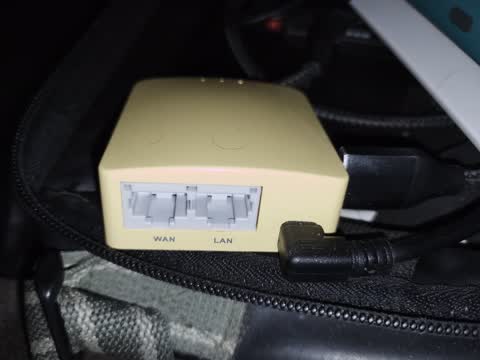
I paid for both ports, I'll ensure that both ports are useful somehow
However, there are two Wi-Fi networks. The same chip can provide multiple Wi-Fi networks that can belong to separate software bridges. Both are set to WPA/WPA2, the one labeled "foxmodem" belongs to the unrestricted side, the one labeled "Petateado" (a mexican spanish word that means "dead") sits on the restricted side. The latter one is where Android phones connect. All SSIDs are set via a direct configuration to broadcast a vendor-specific payload that Windows and iOS recognize as a metered hotspot. A forced DHCP option also exists to make newer Android (14+) devices recognize it as a metered connection too.
The vendor broadcast payload:
wireless.radio0.hostapd_options='vendor_elements=DD080050F21102000400DD0A0017F206010103010000'
It is a combination of two payloads, one for Microsoft and one
for Apple. Both mean the same: this network is a metered hotspot.
The DHCP tag for Android:
dhcp.ANDROID_METERED=tag
dhcp.ANDROID_METERED.dhcp_option='43,ANDROID_METERED'
dhcp.ANDROID_METERED.force='1'
The router also has 3 software-controlled LEDs, physically they are unlabeled, but from left to right if the Ethernet ports are facing you (and the LEDs are on the far side, still on top), software labels them "wifi", "wan" and "power". I set the "wifi" LED (leftmost) to indicate network activity for the unrestricted LAN (its bridge), it's off by default and blinks on if there is activity. The "wan" LED is set to indicate modem (PPP) activity, it will light up if there is an active PPP session (if there is or was cellular signal recently), and blink OFF if data actually passes through. The "power" (rightmost) LED is set to "heartbeat", it blinks like a human heartbeat depending on system (usually CPU) load on the router, it's on by default and the beats blink OFF.
I also set the device to collect cell tower statistics using
the libqmi-tools package, using the qmicli program. The script
uses this data:
qmicli -d /dev/cdc-wdm0 --nas-get-cell-location-info
qmicli -d /dev/cdc-wdm0 --nas-get-rf-band-info
It queries it every 10 seconds, stores it on a temporary file
and then every hour it packs it up and stores it on flash storage
to avoid wearing the flash memory with excessive writes. It serves
no purpose, I just like reading cell tower data at times.
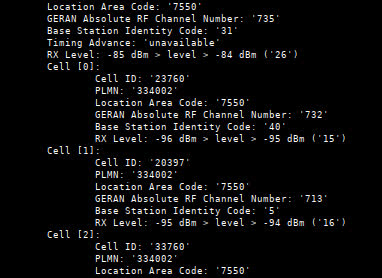
The real thrill comes from finding a cell where none could be detected before
I set firewall rules on iptables that are introduced as part of
/etc/rc.local during modem startup.
iptables -t filter -N SYNLIMIT
iptables -t filter -A FORWARD -s 192.168.0.0/16 -p tcp -m tcp --tcp-flags FIN,SYN,RST,ACK SYN -j SYNLIMIT
iptables -t filter -A SYNLIMIT -m recent --rcheck --seconds 6 --reap --hitcount 1 --name synlimit --mask 255.255.255.255 --rdest -j DROP
iptables -t filter -A SYNLIMIT -m recent --set --name synlimit --mask 255.255.255.255 --rdest
These firewall rules seek to limit TCP connection attempts against
a single host to once every 6 seconds. This affects both the restricted
and unrestricted bridge, and it's meant to avoid firing multiple useless
TCP SYN packets when the cellular link is very laggy (and has multi-second
latency) when no packet is in fact being lost. It has the potential
to make some connections look sluggish but in practice it doesn't seem
to affect user experience, and it significantly reduces power consumption
and mobile traffic when many small individual TCP sessions are being
opened and closed (for example, scripts that make individual HTTP
fetches).
iptables -t filter -N blockdns
iptables -t filter -I INPUT 1 -i br-restricted -p udp --dport 53 -j blockdns
iptables -t filter -I FORWARD 1 -i br-restricted -p udp --dport 53 -j blockdns
These set up the firewall to implement firewall-level DNS blocks against the
restricted bridge (named br-restricted on OpenWRT LuCI configuration). It
is meant to affect users even if they don't use the router's built-in DNS
server.
iptables -t filter -A blockdns -p udp --dport 53 -m string --algo bm --string "whatsapp" -j ACCEPT
iptables -t filter -A blockdns -p udp --dport 53 -m string --algo bm --string "danielthefox" -j ACCEPT
iptables -t filter -A blockdns -p udp --dport 53 -m string --algo bm --string "hass" -j DROP
iptables -t filter -A blockdns -p udp --dport 53 -m string --algo bm --string "redskyline" -j ACCEPT
iptables -t filter -A blockdns -p udp --dport 53 -m string --algo bm --string "gstatic" -j ACCEPT
iptables -t filter -A blockdns -p udp --dport 53 -m string --algo bm --string "connect" -j ACCEPT
iptables -t filter -A blockdns -p udp --dport 53 -m string --algo bm --string "check" -j ACCEPT
iptables -t filter -A blockdns -p udp --dport 53 -m string --algo bm --string "captive" -j ACCEPT
iptables -t filter -A blockdns -p udp --dport 53 -j DROP
These set which domain strings are allowed to pass through. The
blocks are weak but they work in practice. They mostly accept
my own domains except Home Assistant, accept whatsapp, and
some connectivity check subdomains. My Android device says it is
a "limited" network when it's in.
Additionally, only the following destination TCP/UDP ports
are allowed from the restricted side, configured on the LuCI
firewall:
Whatsapp and XMPP
UDP: 3478,45395,59234,50318
TCP: 59234,50318,4244,5222-5282
HTTP and HTTPS
TCP: 80,443,8080
SSH, telnet, FTP
TCP: 21-23
IRC:
TCP: 6665-6667,6697
ICMP is allowed as well. Some extra ports have been enabled by
me as well to allow some tests I do at times.
Once it's all set up, you just plug it in, wait 3 minutes (yes, it takes ages to finish staring) and then you use the SSID you want to use. If you need visual confirmation, look at the power LED. At first, it's solid on, a few seconds later it starts blinking at a constant pace while OpenWRT starts. It takes some time to start, as I said, sometimes up to 3 minutes. Then the power LED will transition to the user configuration, in this case, the heartbeat LED pattern. Once it's there, Wi-Fi is either starting or about to start, and you should try connecting to the Wi-Fi network the router exposes. It's also at this point where the modem will begin looking for cell networks and, if the SIM card has a PIN code, it will be introduced right now. Once you joined and the connection has succeeded, you just use the internet however you want.
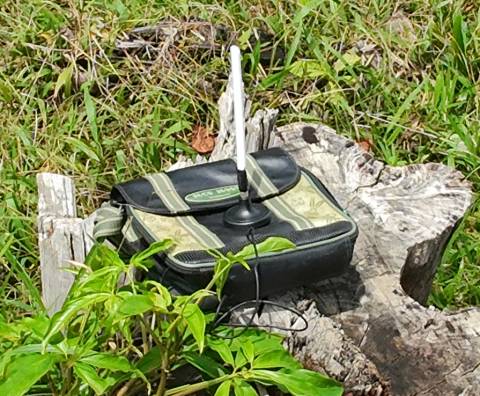
All of this to grab one trickle of 3G signal
I recommend setting the SSIDs to avoid autojoining them on your devices (android, windows, linux networkmanager) so you don't accidentally join them and use mobile data if you left the device on if your household wifi has a hiccup. Even better, you should turn this off when you're not using it. Even if your device has capabilities for detecting that these networks are expensive and metered, take this chance to ensure that it has been correctly labeled as a metered use network. If it wasn't, manually set it up as such yourself. Else your devices may want to perform updates or transfer telemetry data on the network unaware that it costs money to use.
If you are unsure if a device will treat a network as metered as soon as it connects, consider disconnecting the USB modem so the router stays turned on but is no longer online. This will prevent mobile data from being used and potentially gives you a chance to verify for yourself that the device will, in fact, recognize such a situation. Other devices do not recognize the idea of a metered or expensive connection, if your device doesn't have such a concept explicitly and isn't itself a Linux computer, it likely doesn't have a way to be told so.
In order to turn the device off, simply turn the powerbank or unplug it. Consider unplugging only the USB-A side of the cable, which sits on the powerbank. The micro-USB connector on the router side is fragile and works worse over time if it's subject to constant physical use. If you intend to use the powerbank only for this rig (not my case, I also need it for charging my smartphone or running some 5V devices during power blackouts) consider never unplugging it, using the powerbank's physical button (in a specific sequence) to turn the router off without unplugging anything, and charging the powerbank while still in the bag or container.
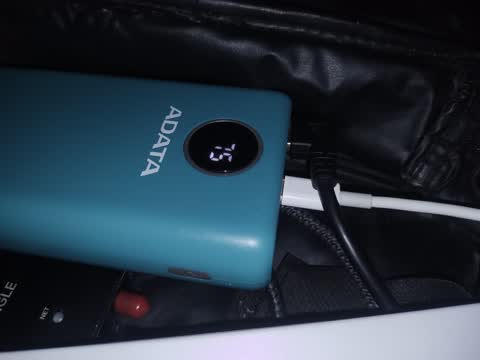
This powerbank is charging
Neither the router or the modem require a graceful shutdown sequence. The flash filesystem on the router is robust and will not suffer significant damage even if shut down during a write. Mid-write data will be lost instead. The modem uses fixed-location flash writes that only alter data without adding or removing it. If a shutdown happens during a write, either the old or the new data will be stored, the data is valid during the next start regardless of what happens. You can simply unplug the setup and nothing bad will happen.
There's no technical reason why a graphical interface program has to use more data over the network than a command line interface program. Both kinds of programs could easily have all necessary assets already stored on your device's storage and load them from there, and only use the network for necessary communication with servers or whatever.
In practice, command line interface programs tend to require less bandwidth because they simply can't make use of things that normally require it. A text terminal can't use graphics and generally won't use sounds either, other than basic pings and beeps. So, while a graphical interface program could choose between loading assets from the network or from the disk, a CLI program simply can't use either at all, so there is zero chance of loading graphical resources.
If you intend to use WhatsApp or modern messaging apps, please use the phone apps, not the desktop nor browser apps. The phone apps already have all necessary graphical assets stored on your phone. The desktop apps usually are browsers in disguise and will load absolutely everything from the network, regardless of which operating system you use.
If you want to browse the web, try using a text browser like lynx or links. They will not be able to load scripts, images or video so if the websites you intend to read are primarily text, this is the most economical way. Plus, they're modern browsers despite the appearance and can make use of modern efficiency improvements like compressed over-the-wire pages and encrypted connections. Some websites, especially those with many ads, will complain that you need JavaScript, and graphical websites will of course not work on a text browser. In that case, plan ahead and test the sites you need in order to find out under which situations they use less data. I do this when trying to use wireless network link calculators, which I sometimes do as part of my job.
If you want to use XMPP (or Jabber, same thing), you should try either Conversations for Android (downloaded via F-Droid, because the Google Play one is paid, unless you want to give the creator some money as a quasi-donation) or profanity for Linux CLI.
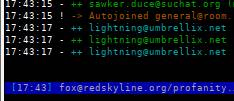
If you need IRC, try WeeChat or irssi. I personally use WeeChat so I can't help you on irssi. WeeChat can make use of IRCv3 features that usually are quality of life improvements, but if you are ultra constrained, they may not be that efficient. I disabled the following ones:
- echo-message
- userhost-in-names
- away-notify
- account-notify
- extended-join
And I enabled the following ones:
- batch
- server-time
Not with this rig. More on it later. Stay tuned.
Listen to music that's on your storage drive. Oh, you don't have music on your laptop? Hmm, maybe you have some .MP3 files on your cellphone. If that fails, maybe dust that old iPod or a Sony Discman. If that fails, bring a concertina and start playing some sea shanties. Beyond that, I can't help you on the music side of things.
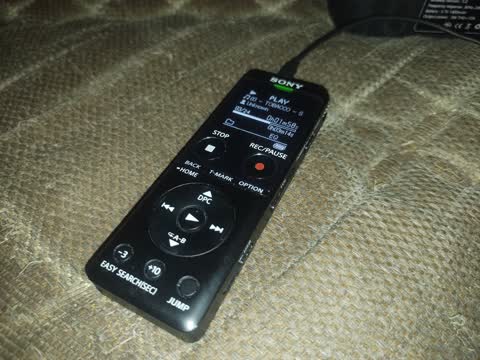
Misusing a voice recorder as an MP3 player (with positive results)
If signal is too low, it works slowly. When it's fast, it works fast. Unlike Wi-Fi, which tends to lose packets when you're too far away and become laggier when the network is congested, cell networks tend to become laggier under both situations, especially when you're far away. The way I see it, cell networks are seemingly configured to not lose a packet no matter the cost. This can cause bufferbloat if you are in the middle of a huge download and need to play videogames. Cell networks do lose packets but only when the cell network itself is severely degraded, for example, if you're on a rural cell tower that's extremely congested. Even then, it will prefer to raise latency over losing packets if your required bandwidth is very low.
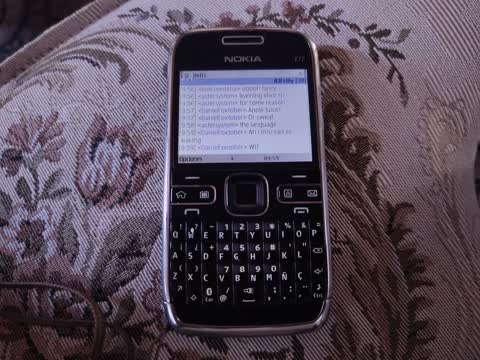
"The spotlight is on!"
Well, that's what I use when I'm out and about. I do use traditional data plans and SIM cards when I need a lot of data, for example, for downloading a large file or something. Otherwise, I prefer spending three cents per megabyte and chatting for hours for less than 10 cents a day. The plan is so cheap that I can do something like using a regular website twice or thrice a month and still spend less than if I paid for a whole month of mobile data.
Plus, the SIM card stays connected all the time at a very low base cost, which is extremely valuable because instead of having to top the balance up first, I can begin using the internet immediately, from the get go. It's cheap enough that I can actually enjoy using it, and sometimes use it on purpose when I want to focus on text chats and listening to offline music instead of flushing my brain on vertical videos and doomscrolling.
So, that's about it. Cheers, and have a nice day.